This guide explains how to measure luminance (cd/m^2) of visual stimuli for reporting purposes.
Step 0: Update firmware only if needed
If your computer does not recognize the device, you may need to update the firmware. In many cases, the ColorCAL 3 is detected automatically.
1. Manual method
This method is simple and fast. If your stimulus contains only a few components, such as a background and a disk, and you only want to report luminance values in a paper, this is usually enough.
Setup
- Use the same display and settings as in the experiment.
- Present stimuli full-screen.
Connection
- Plug in the ColorCAL 3.
- In Terminal, list connected USB devices:
ls /dev/tty.usb*
This command will list devices connected through USB. Find the one named something like usbmodemXXXX.
- Connect to the device:
screen /dev/tty.usbmodemXXXX
- Type
?and press Enter to open the device menu and confirm the connection.
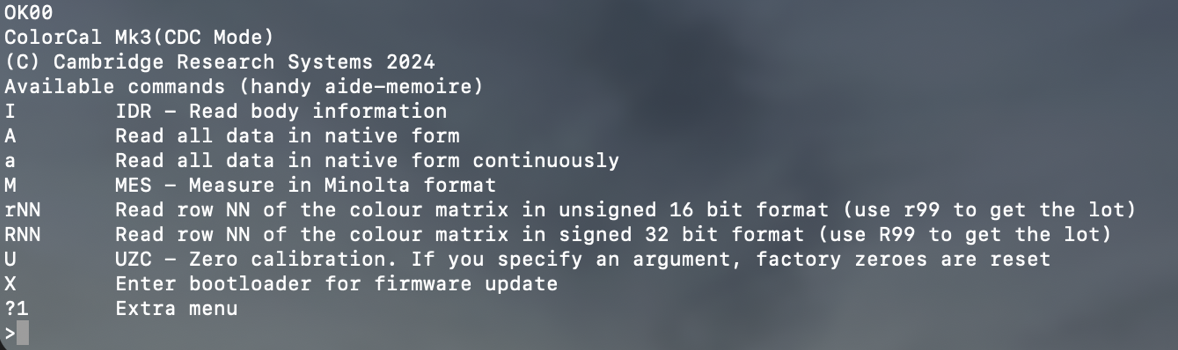
At that point, the device is ready to take measurements.
Measurement
- Display the stimulus you want to measure, such as the background or the target.
- Place the device flat at the center of the screen.
- Type
Mand press Enter. TheMmay not be visible in the terminal. - The device output should look like this:
OK00, Y, x, y
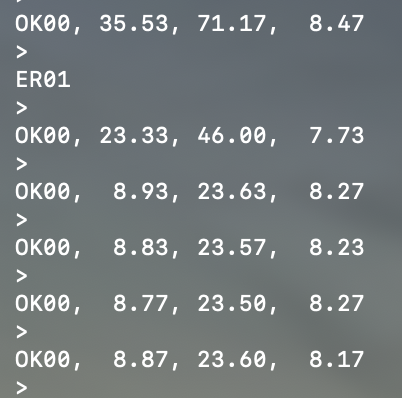
Use Y as the luminance value in cd/m^2.
- Take
5to10measurements per condition. - Record the values and compute the mean.
2. Automated method with PsychoPy
Use this method if you want to record luminance values repeatedly from code.
Setup
- Plug the ColorCAL 3 into the experiment computer.
- Use the same display settings as in the experiment.
Example code
from psychopy.hardware.crs.colorcal import ColorCAL
from psychopy import visual

win = visual.Window(fullscr=True, color=[0, 0, 0])
cc = ColorCAL()

# Example stimulus
stim = visual.Rect(win, width=2, height=2, fillColor=[0, 0, 0])

levels = [-1, -0.5, 0, 0.5, 1]

for level in levels:
    stim.fillColor = [level, level, level]
    stim.draw()
    win.flip()
    luminance = cc.getLum()
    print(level, luminance)